





Gaming PCs Built for
Starfield
Starfield is one of the most CPU-demanding open world titles available. Procedural planet generation, dense NPC cities, and landing sequences place sustained load on the processor in a way most games do not. AMD Ryzen X3D CPUs show a clear advantage here — the large cache reduces the stalls that cause inconsistent frame delivery during transitions.
Browse the builds below or call Kevin on 01902 714533. Tell him your target resolution, whether you plan to run mods, and your budget — he will confirm the right CPU and RAM combination for your setup.


Grid List
5 Item(s)
-
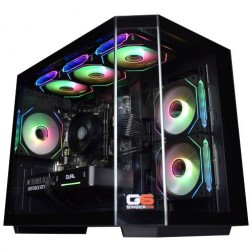 AMD Ryzen 5 8400f Nvidia RTX 5060 Ti Gaming PC - G6 Fusion 600 X5
AMD Ryzen 5 8400f 6 core
A620M Motherboard
16GB+ DDR5 5200MHz
FAST 1TB M.2 NVMe SSD
8GB Nvidia RTX 5060 Ti Graphics
300mbps Wifi
Windows 11 Home£1,279.99
£1,180.00
AMD Ryzen 5 8400f Nvidia RTX 5060 Ti Gaming PC - G6 Fusion 600 X5£1,279.99
£1,180.00
AMD Ryzen 5 8400f 6 core
A620M Motherboard
16GB+ DDR5 5200MHz
FAST 1TB M.2 NVMe SSD
8GB Nvidia RTX 5060 Ti Graphics
300mbps Wifi
Windows 11 Home
-
 AMD Ryzen 7 8700f RTX 5060 Ti Gaming PC - G6 Fusion 800 X3
AMD Ryzen 7 8700f 8 core
A620M Motherboard
16GB+ DDR5 5200MHz
FAST 1TB M.2 NVMe SSD
8GB Nvidia RTX 5060 Ti Graphics
300mbps Wifi
Windows 11 Home£1,349.99
£1,259.99
AMD Ryzen 7 8700f RTX 5060 Ti Gaming PC - G6 Fusion 800 X3£1,349.99
£1,259.99
AMD Ryzen 7 8700f 8 core
A620M Motherboard
16GB+ DDR5 5200MHz
FAST 1TB M.2 NVMe SSD
8GB Nvidia RTX 5060 Ti Graphics
300mbps Wifi
Windows 11 Home
-
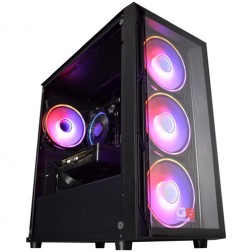 Intel Core i5 12400f RTX 5060 Pre Built Next Day Gaming PC - G6 ND 800
Intel Core i5 12400F 6 Core
H610 Motherboard
16GB DDR5 Memory
1TB M.2 NVMe SSD Drive
8GB Nvidia RTX 5060 Graphics
300MBPs Wifi
Windows 11 Home£1,121.95
£1,000.00
Intel Core i5 12400f RTX 5060 Pre Built Next Day Gaming PC - G6 ND 800£1,121.95
£1,000.00
Intel Core i5 12400F 6 Core
H610 Motherboard
16GB DDR5 Memory
1TB M.2 NVMe SSD Drive
8GB Nvidia RTX 5060 Graphics
300MBPs Wifi
Windows 11 Home
-
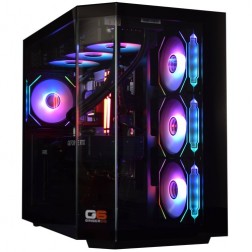 Intel Core Ultra 7 265K Nvidia RTX 5070 Ti Gaming PC - G6 Genesis U2
Intel Core Ultra 7 265Kf 20 core
B860 Motherboard
32GB+ DDR5 5200MHz Memory
FAST 1TB+ M.2 NVMe SSD
16GB Nvidia RTX 5070 Ti Graphics
FAST Wifi & Bluetooth
Windows 11 Home
Intel Core Ultra 7 265K Nvidia RTX 5070 Ti Gaming PC - G6 Genesis U2
Intel Core Ultra 7 265Kf 20 core
B860 Motherboard
32GB+ DDR5 5200MHz Memory
FAST 1TB+ M.2 NVMe SSD
16GB Nvidia RTX 5070 Ti Graphics
FAST Wifi & Bluetooth
Windows 11 Home
-
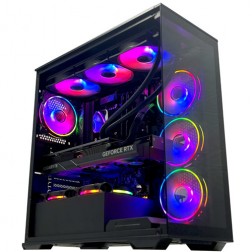 Intel Core i9 14900K Nvidia RTX 5080 Gaming PC - G6 Galactic U3
Intel Core i9 14900KF 24 core
Z790 Motherboard
32GB+ DDR5 5200MHz
FAST 1TB+ M.2 NVMe SSD
16GB Nvidia RTX 5080 Graphics
FAST Wifi & Bluetooth
Windows 11 Home
Intel Core i9 14900K Nvidia RTX 5080 Gaming PC - G6 Galactic U3
Intel Core i9 14900KF 24 core
Z790 Motherboard
32GB+ DDR5 5200MHz
FAST 1TB+ M.2 NVMe SSD
16GB Nvidia RTX 5080 Graphics
FAST Wifi & Bluetooth
Windows 11 Home
Grid List
5 Item(s)
What Does Starfield Need?
Starfield is CPU-first. The GPU determines visual quality and resolution headroom — but the CPU determines whether frame delivery is consistent during the transitions and city areas that define this game's most demanding moments.
Figures are estimates based on available benchmark data. Actual performance varies by CPU pairing, RAM speed, and system configuration. Kevin will confirm expected performance for your setup before you order.
What Each Budget Delivers in Starfield
Four honest assessments. What each tier delivers across Starfield's different environments and whether the step up is worth it for the way you play.

60fps at 1080p high in open planetary environments and ship interiors. The CPU limit becomes visible during landing sequences — a brief frame rate dip as the game generates the landing zone is the most common symptom of a budget CPU in Starfield. New Atlantis and Neon, the game's two densest cities, produce similar dips in the busiest street areas. Medium settings in those areas recover frame rate consistency. A 144Hz monitor is well matched to this tier.

60 to 75fps at 1440p high with consistent frame delivery in most environments. Landing sequences are smoother — the Core i7 handles the procedural generation workload without the visible dip of a budget CPU. New Atlantis at medium-high settings runs without frame rate interruptions in the main commercial district. If you plan to run mods, 32GB RAM over 16GB is the most cost-effective upgrade at this tier — it reduces background data loading stutter when texture replacers are active. A 1440p monitor is the right pairing here.

1440p ultra with consistent frame delivery throughout. This is the tier where a Ryzen 7 X3D is the specific recommendation for Starfield. The additional 3D V-Cache holds landing zone generation data closer to the CPU cores, measurably reducing the transition stalls that affect lower-tier CPUs. The difference is most obvious during rapid fast travel sequences and when landing on densely populated planets. If Starfield is a significant part of your game library, the X3D CPU is worth naming at this tier. DLSS extends headroom toward 4K at quality mode.

4K with DLSS or FSR for comfortable frame rates at ultra settings. At this tier, every bottleneck that Starfield can impose is removed. Landing transitions are seamless, cities run at sustained high frame rates, and the GPU renders 4K textures at maximum resolution without compromise. Justified for buyers with a 4K display and a wide game library, given that the high-end tier already handles Starfield beyond what most players require at 1440p.
Why Starfield Asks More of Your CPU Than Most Open World Games
Starfield uses a modified Creation Engine with procedural generation systems that differ from most open world engines. When you land on a planet or fast travel to a populated location, the game generates the immediate area from stored seed data, loading geometry, NPC placement, and environmental state simultaneously. This is a CPU-heavy operation that cannot be offloaded to the GPU. The brief frame rate dip that many players notice during landing is this generation process completing in real time.
The game's populated cities — New Atlantis, Neon, Akila — run a continuous NPC simulation that keeps dozens of characters active simultaneously, each with schedules, dialogue states, and combat awareness. Combined with the game's generous draw distance and detailed interior environments, this places sustained CPU load during open exploration that other visually comparable games do not match.
AMD Ryzen X3D processors perform particularly well in Starfield because the 3D V-Cache architecture keeps more game data resident in the CPU's fast cache memory. Rather than fetching procedural generation data from slower system RAM repeatedly during transitions, an X3D CPU holds that data closer to the processing cores. The result is measurably smoother frame delivery during the transitions where standard CPUs dip. This is one of the clearest practical cases for X3D in a mainstream gaming workload.
If you are building for Starfield alongside other open world and RPG titles — Baldur's Gate 3 in particular — the CPU-first spec that benefits Starfield carries directly across. Both games load the CPU harder than they load the GPU relative to their visual fidelity, making a fast processor with 32GB RAM the consistent recommendation across the entire category.
Medium vs Ultra Settings: The Visual Difference
Drag the slider to compare medium and ultra settings. Lighting quality, shadow detail, and texture resolution on character models show the most visible change between tiers.


Three Types of Starfield Player

Wants Starfield's worlds to look as good as the game allows at a consistent frame rate. The mid-range build — RTX 5060 Ti, Core i7, 1440p — is the practical choice. High settings throughout with smooth frame delivery in most areas. The step to high-end is worth it if you own a 1440p ultra-wide or want 1440p ultra settings without frame rate trade-offs in cities.

Heavy texture and NPC overhaul mods require more RAM and CPU headroom than the base game. 32GB RAM is not optional for a heavily modded install — 16GB shows stutter as the modded texture pool exceeds available memory. A faster Core i7 or Ryzen 7 manages the additional NPC scripting load that companion and city overhaul mods add. The mid-range build with 32GB RAM is the right starting point for a modded playthrough.

Has played other open world games with stuttery landing sequences and NPC-heavy cities. Specifically wants Starfield to feel smooth throughout — not just in open areas. The high-end build with a Ryzen 7 X3D is the most targeted solution. The X3D cache advantage in Starfield is one of the most consistent real-world CPU performance differences in any current open world game.
Call Kevin on 01902 714533 or email [email protected]. Tell him:
1. The games you play most often
2. Your monitor resolution and refresh rate
3. Whether you stream, record, or edit alongside gaming
4. Your approximate budget
No charge for the conversation. No pressure to buy.
Will This Build Cover Your Other Games?
Recommended Ginger6 Builds for Starfield
Three builds matched to Starfield's CPU-first demands. Each one is sized to handle the game's most intensive environments without frame rate compromise.
RTX 5060 with Core i5 or Ryzen 5. Covers Starfield at 1080p high in open areas and ship interiors. Some frame variance during landing sequences is the trade-off at this tier. Well matched to a 1080p or 1440p monitor at medium-high settings.
RTX 5060 Ti with Core i7 and 16GB DDR5. Landing sequences and city exploration run consistently at 1440p high. Upgrade to 32GB RAM if you plan to run mods. The most popular tier for Starfield buyers upgrading from a laptop or budget desktop.
RTX 5070 Ti with Ryzen 7 X3D and 32GB DDR5. The most targeted Starfield build in the range. X3D cache advantage eliminates landing sequence stalls. 1440p ultra with consistent frame delivery in every environment, including New Atlantis at peak NPC density.

Built for Frame Consistency, Not Just Frame Rate
Starfield measures well in controlled benchmarks but tells a different story in real-world play. Landing sequences, city transitions, and heavily populated areas expose the difference between a machine that scores high and a machine that feels smooth throughout. Every Ginger6 Starfield build is configured with this distinction in mind — CPU selection, RAM specification, and cooling are all chosen to address the sustained, variable load this game places on the processor.
Cable management is handled to maintain airflow around the CPU, which in Starfield is the component under the most sustained thermal load. A processor that thermal throttles during a long New Atlantis session or a rapid fast-travel sequence delivers the same inconsistency as a slower CPU. Clean routing between intake and exhaust keeps thermal performance stable across the full session, not just the first hour.
Before dispatch, BIOS settings are configured for the specific CPU pairing: XMP or EXPO memory profiles enabled and verified, X3D cache settings confirmed where applicable, and firmware stability tested. Every build runs a 24-hour stress test covering thermal behaviour under sustained load, processor and graphics stability during extended use, memory responsiveness, storage performance, and BIOS firmware stability. For a game with Starfield's variable CPU load profile, the thermal and memory stability checks are particularly relevant.
Kevin's 3-year warranty covers every component. For buyers investing in an X3D build for Starfield and a wider game library, that warranty spans multiple game releases. Kevin is reachable on 01902 714533 — for Starfield buyers specifically, he can confirm whether the X3D CPU variant is worth the additional cost given your wider gaming library before you commit.
What Do Ginger6 Customers Say?
Over 1,100 verified reviews with a 93% five-star rating.
The most consistent theme in gaming reviews: honest pre-sale advice that matches the build to the actual use case, and support that continues after delivery.
Read All Trustpilot ReviewsI emailed Kevin to be sure if what I put down to order was suitable, Kevin supported me to change a few things around and since having the PC for a few weeks it is absolutely amazing and a stunning looking PC. Also fast service and delivery too. I recommend Ginger6 as I will be upgrading from them in the future.
Built to a very high standard with excellent cable management. Unbelievably quiet and without doubt the best pc I have ever purchased. Boots up in 20 seconds. 10/10.
The 2 PCs bought by myself and my son have been top class. My son has had contact with the team and been happy with the response. I am now ordering another one. Thank you for top class service.
Common Questions About Starfield Builds
Starfield is one of the games where AMD Ryzen X3D processors show the clearest advantage. The large 3D V-Cache reduces the frequency of procedural generation stalls during landing sequences and city transitions. Intel Core i7 and i9 also perform well, but X3D is the specific recommendation for buyers who want maximum frame consistency in loading-heavy transitions.
16GB DDR5 is the minimum for a stable Starfield experience. 32GB is recommended for buyers who run the game heavily modded, or who run Discord, streaming software, or a browser alongside the game. Additional RAM reduces the frequency of background data loading that causes minor frame rate inconsistency.
An RTX 5060 Ti or RX 9070 handles Starfield at 1440p high settings with comfortable frame rates. The GPU is the secondary bottleneck — the CPU does more of the heavy work. Upscaling with DLSS or FSR is available and works well, extending GPU headroom to 1440p ultra or 4K on mid-range and high-end builds.
Starfield uses a modified Creation Engine that places significant load on the CPU during open world transitions, NPC processing, and procedural planet generation. It is more CPU-intensive than most open world games at the same visual fidelity. DLSS and FSR support is available and extends GPU headroom effectively, but no upscaling technology reduces the CPU load.
Yes. Starfield supports both DLSS (Nvidia GPUs) and FSR (AMD and Nvidia GPUs). At 1440p and above, upscaling is useful for extending GPU performance at higher visual settings. It does not reduce CPU load, so a fast processor remains the priority component for Starfield performance.
Yes, with caveats. Light to moderate mod loads run well on a mid-range build with 16GB RAM. Heavy texture and NPC overhaul mods benefit from 32GB RAM and a faster CPU. Script-heavy community mods place more CPU load than texture replacers, so CPU and RAM matter more than GPU for modded Starfield.
Yes — more so in Starfield than in most games. The large 3D V-Cache holds more game data close to the CPU cores, reducing the frequency of stalls during procedural planet generation and city transitions. The improvement is most noticeable during landing sequences and when moving between interior and exterior areas with large NPC populations.
Starfield does not have a frame rate cap and runs at whatever the hardware can sustain. 60fps at 1440p high is achievable on a mid-range build. Pushing to 90fps or above requires a high-end CPU with strong single-core performance alongside a capable GPU. Most buyers target 60fps at their chosen resolution rather than the higher frame rates relevant to competitive games.
Find the Right Build for Starfield
Browse the gaming PC range or call Kevin directly. Tell him your target resolution, whether you play other CPU-heavy games alongside Starfield, and your budget. He will confirm whether the X3D CPU is worth the additional spend for your setup.