




Gaming PCs Built for
Baldur's Gate 3
Baldur's Gate 3 is CPU and RAM intensive — particularly in Act 3, where the city's NPC density and AI scripting push both components hard. The right build starts with a fast processor and 32GB RAM, not just a powerful GPU.
Browse the builds below or call Kevin on 01902 714533. Tell him your preferred resolution, whether you plan to play co-op, and your budget — he will confirm the right build for your playthrough.


Grid List
4 Item(s)
-
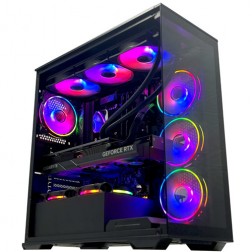 Intel Core i9 14900K Nvidia RTX 5080 Gaming PC - G6 Galactic U3
Intel Core i9 14900KF 24 core
Z790 Motherboard
32GB+ DDR5 5200MHz
FAST 1TB+ M.2 NVMe SSD
16GB Nvidia RTX 5080 Graphics
FAST Wifi & Bluetooth
Windows 11 Home
Intel Core i9 14900K Nvidia RTX 5080 Gaming PC - G6 Galactic U3
Intel Core i9 14900KF 24 core
Z790 Motherboard
32GB+ DDR5 5200MHz
FAST 1TB+ M.2 NVMe SSD
16GB Nvidia RTX 5080 Graphics
FAST Wifi & Bluetooth
Windows 11 Home
-
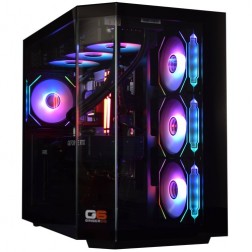 Intel Core Ultra 7 265K Nvidia RTX 5070 Ti Gaming PC - G6 Genesis U2
Intel Core Ultra 7 265Kf 20 core
B860 Motherboard
32GB+ DDR5 5200MHz Memory
FAST 1TB+ M.2 NVMe SSD
16GB Nvidia RTX 5070 Ti Graphics
FAST Wifi & Bluetooth
Windows 11 Home
Intel Core Ultra 7 265K Nvidia RTX 5070 Ti Gaming PC - G6 Genesis U2
Intel Core Ultra 7 265Kf 20 core
B860 Motherboard
32GB+ DDR5 5200MHz Memory
FAST 1TB+ M.2 NVMe SSD
16GB Nvidia RTX 5070 Ti Graphics
FAST Wifi & Bluetooth
Windows 11 Home
-
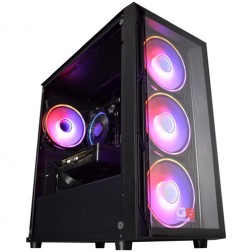 Intel Core i5 12400f RTX 5060 Pre Built Next Day Gaming PC - G6 ND 800
Intel Core i5 12400F 6 Core
H610 Motherboard
16GB DDR5 Memory
1TB M.2 NVMe SSD Drive
8GB Nvidia RTX 5060 Graphics
300MBPs Wifi
Windows 11 Home£1,121.95
£1,000.00
Intel Core i5 12400f RTX 5060 Pre Built Next Day Gaming PC - G6 ND 800£1,121.95
£1,000.00
Intel Core i5 12400F 6 Core
H610 Motherboard
16GB DDR5 Memory
1TB M.2 NVMe SSD Drive
8GB Nvidia RTX 5060 Graphics
300MBPs Wifi
Windows 11 Home
-
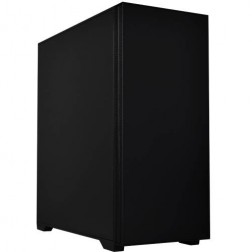 Intel Core i7 14700f RTX 5060 Ti Pre-Built Next Day PC - G6 ND 1500
Intel Core i7 14700f Twenty Core
Gigabyte B760M DS3H AX
32GB 5200mhz DDR5
1TB M.2 NVMe SSD Drive
16GB Nvidia RTX 5060 Ti Graphics
1733mbps Wifi & Bluetooth
Windows 11 Home£1,916.16
£1,750.00
Intel Core i7 14700f RTX 5060 Ti Pre-Built Next Day PC - G6 ND 1500£1,916.16
£1,750.00
Intel Core i7 14700f Twenty Core
Gigabyte B760M DS3H AX
32GB 5200mhz DDR5
1TB M.2 NVMe SSD Drive
16GB Nvidia RTX 5060 Ti Graphics
1733mbps Wifi & Bluetooth
Windows 11 Home
Grid List
4 Item(s)
What Does Baldur's Gate 3 Need?
BG3 is heavier on CPU and RAM than most modern RPGs. The GPU matters, but a fast processor and 32GB RAM in Act 3 make a more noticeable difference than a GPU upgrade alone.
Figures are estimates based on available benchmark data. Actual performance varies by specific CPU pairing, RAM speed, and system configuration. Kevin will confirm expected performance for your setup before you order.
What Each Budget Delivers in Baldur's Gate 3
Four honest assessments. What each tier achieves in each act, where it shows its limits, and whether the step up is worth it for the way you play.

Solid 60fps at 1080p high in Acts 1 and 2. The Emerald Grove, the Underdark, and the Mountain Pass all run smoothly. Act 3 — the city of Baldur's Gate itself — shows the limits of 16GB RAM and a mid-range CPU: frame rates drop in busy market areas and during large combat encounters. Playing on medium settings in Act 3 recovers most of the smoothness. If your budget allows any additional spend, putting it into 32GB RAM makes a more meaningful improvement than a GPU upgrade at this tier.

80 to 90fps at 1440p high throughout most of the game. Act 3 remains smooth because the Core i7 and 32GB RAM address the two components that determine Act 3 performance. Combat encounters with multiple spellcasters maintain consistent frame delivery. The 32GB RAM is not a luxury at this tier — it is the direct reason Act 3 behaves differently here than at budget. Co-op players hosting a multiplayer session will find this the minimum comfortable tier for a full party in Act 3.

1440p ultra with consistent frame delivery across all three acts. Character model detail, volumetric lighting, and shadow quality at maximum settings make a genuine visual difference in BG3's most elaborately staged scenes. DLSS or FSR extends headroom to 4K at quality mode if you own a 4K monitor. For players who also run GPU-heavy titles alongside BG3 — Cyberpunk 2077, Hogwarts Legacy — the RTX 5070 Ti earns its position at 1440p ultra across the full game library.

4K ultra with DLSS Quality for additional frame rate headroom. The RTX 5080 handles BG3 at native 4K ultra with room to spare. Act 3 at 4K is as demanding a test as BG3 produces — the combination of CPU, RAM, and GPU at this tier eliminates every frame rate ceiling the game can impose. Justified primarily for buyers with a 4K monitor and a wide game library beyond BG3, given that the high-end tier already exceeds what BG3 alone requires at 1440p.
Why Baldur's Gate 3 Is Harder to Run Than It Looks
Baldur's Gate 3 is built on a modified version of Larian Studios' Divinity Engine, which handles simultaneous AI scripting for every NPC in a scene. In Acts 1 and 2, this is manageable. Act 3 is different. The city of Baldur's Gate has hundreds of individually scripted characters active at the same time, each with dialogue states, faction awareness, and combat readiness. The CPU is processing all of that continuously, not just during combat.
RAM capacity matters alongside CPU speed. At 16GB, Windows, the game, and background processes compete for available memory. The result in Act 3 is not a crash — it is frame rate inconsistency as the system moves data to and from storage to compensate. 32GB DDR5 gives the engine enough working space to keep everything active in memory. The improvement in Act 3 smoothness is measurable and consistent across hardware tiers.
The GPU matters most for shadow quality, texture resolution, and volumetric lighting — the settings that determine how the game's elaborate environments look at high and ultra. BG3's art direction is detailed enough that the difference between high and ultra settings is visible in well-lit outdoor areas and in the game's character close-ups. At 1080p, a mid-range GPU handles ultra without issue. At 1440p, the jump to a faster GPU pays off in frame rate margin rather than visual quality alone.
If you are also considering other open world and RPG titles alongside BG3, the same CPU and RAM profile that benefits BG3 in Act 3 also benefits Starfield, Cyberpunk 2077, and Elden Ring — all of which place heavy sustained load on the processor and memory subsystem during complex scenes.
Medium vs Ultra Settings: What Changes?
Drag the slider to compare the same scene at medium and ultra settings. Shadow quality, foliage density, and NPC texture detail show the most visible improvement.


Three Types of BG3 Player
.jpg)
Wants BG3 to look and feel as good as it possibly can. The high-end build — RTX 5070 Ti, Core i7, 32GB RAM — at 1440p ultra is the right match. Every scene is rendered at its intended visual quality, Act 3 runs smoothly, and the 3-year warranty means the machine stays in the same condition well past the 100-hour campaign mark.
.jpg)
Played BG3 on console or a laptop and wants the full PC experience. The mid-range build — RTX 5060 Ti, Core i7, 32GB RAM — handles BG3 at 1440p high throughout all three acts. It also covers the wider game library: Elden Ring, Cyberpunk 2077, and whatever RPG follows BG3 next. Kevin is reachable if you need advice on which build matches your monitor.
.jpg)
BG3 co-op shifts more AI and world-state processing to the host machine. Hosting four players in Act 3 adds meaningful CPU load on top of the already demanding city simulation. The mid-range build is the practical minimum for a full party in Act 3. 32GB RAM is not optional here — it is the component that separates a smooth host experience from a stuttering one in the final act.
Call Kevin on 01902 714533 or email [email protected]. Tell him:
1. The games you play most often
2. Your monitor resolution and refresh rate
3. Whether you stream, record, or edit alongside gaming
4. Your approximate budget
No charge for the conversation. No pressure to buy.
Will This Build Cover Your Other Games?
Recommended Ginger6 Builds for Baldur's Gate 3
Three builds matched to BG3. Each one is sized to handle the game's CPU and RAM demands across all three acts.
RTX 5060 with Core i5 and 16GB DDR5. Covers Acts 1 and 2 at 1080p high with consistent frame delivery. Act 3 runs at medium settings. The right starting point if 1080p is your target resolution and you plan to upgrade later.
RTX 5060 Ti with Core i7 and 32GB DDR5. The build that handles all three acts at 1440p high without compromise. 32GB RAM is included as standard — it is what makes Act 3 smooth, and the most common upgrade buyers wish they had made from the start.
RTX 5070 Ti with fast Core i7 and 32GB DDR5. 1440p ultra across the entire game with frame rate headroom to spare. Also covers Cyberpunk 2077, Hogwarts Legacy, and any GPU-demanding title in the same RPG library.
.jpg)
Built for Long Sessions, Not Just Benchmarks
Baldur's Gate 3 is not a game played for an hour. A well-optimised build for BG3 needs to sustain CPU performance across a four-hour Act 3 session without thermal throttling reducing clock speeds mid-combat. Component selection for every Ginger6 BG3 build starts with a CPU cooler rated for sustained loads, not just peak burst performance.
Cable management inside the case is handled specifically to support airflow around the CPU and RAM — the two components BG3 loads most heavily. Clean routing reduces restriction on the airflow path between the front intake and rear exhaust, which keeps CPU temperatures consistent over a long session. A CPU that throttles during Act 3's most demanding areas produces the same result as a CPU that was simply not fast enough.
Before dispatch, BIOS settings and memory profiles are configured and verified. XMP or EXPO profiles are enabled so your DDR5 RAM runs at its rated speed, not the JEDEC default. For BG3, RAM speed has a measurable effect on Act 3 frame consistency — slower RAM at rated capacity still limits CPU throughput. Every build runs a 24-hour stress test covering thermal behaviour under sustained load, processor and graphics stability, memory responsiveness, storage performance, and BIOS firmware stability.
Kevin backs every build with a 3-year warranty and is reachable on 01902 714533 if anything needs attention after delivery. For buyers investing in a mid-range or high-end build for BG3 and a wider RPG library, that warranty covers the machine through multiple game cycles. Most questions are answered over the phone without needing to return the system.
What Do Ginger6 Customers Say?
Over 1,100 verified reviews with a 93% five-star rating.
The most consistent feedback from gaming buyers: builds that perform exactly as specified, honest advice on spec, and support that continues well after the machine arrives.
Read All Trustpilot ReviewsI recently had a custom gaming PC built and delivered by Ginger6, and I couldn't be more impressed. They took the time to understand my specifications and even made some great recommendations that really enhanced the final build. The cable management is immaculate, and they were so meticulous that even the screw heads were kept in perfect condition.
Fantastic service, easy website to use. Had a gaming machine built to my own spec. Build looked fantastic, really neat and tidy. One internal component needed sorting and the issue was fixed the same evening. After sale service was great and that is a key thing with a new build. The phone was answered on second or third ring when I called. Emails answered quickly. Altogether really satisfied.
Inside looks super neat, runs very quiet and the fans keep the computer super cool. Haven't had a problem with it.
Common Questions About BG3 Builds
16GB DDR5 is sufficient for Acts 1 and 2. Act 3, set in Baldur's Gate city, is significantly more demanding on both CPU and RAM. 32GB DDR5 is recommended if you plan to play Act 3 without stuttering, especially with a high-end GPU pushing higher settings. All Ginger6 builds over £1400 include 32GB as standard for this reason.
An RTX 5060 Ti or RX 9070 handles 1440p high settings at around 80 to 90fps. For 1440p ultra with ray tracing enabled, an RTX 5070 or RX 9070 XT is the practical minimum. The GPU is less critical in BG3 than in most modern RPGs — the CPU and RAM are the first components to upgrade.
Yes, particularly in Act 3. The city of Baldur's Gate has dense NPC populations, active AI scripting, and complex environmental interactions that place sustained load on the CPU. A fast Core i7 or Ryzen 7 handles this well. A slower Core i5 shows frame rate inconsistency in the busiest city areas at higher settings.
Yes. A budget build with an RTX 5060 and Core i5 runs BG3 at 1080p high settings at around 60fps in most areas. Act 3 will show some frame rate dips in the busiest city sections. 16GB RAM is adequate for Acts 1 and 2. If your budget allows 32GB, the experience in Act 3 is noticeably smoother.
Baldur's Gate 3 supports both DLSS (on Nvidia GPUs) and FSR (on AMD and Nvidia GPUs). At 4K, upscaling is practical at the enthusiast tier to maintain smooth frame rates at ultra settings. At 1440p, a mid-range to high-end build does not require upscaling to play comfortably.
Yes. BG3 supports up to four players in co-op. The host PC runs the most demanding workload, handling NPC AI and world state for all players. A mid-range build is the recommended minimum for hosting a full four-player co-op session, particularly in Act 3 where the combined AI and RAM load is highest.
At 1080p: high settings are comfortable on a budget build. At 1440p: high to ultra on a mid-range build. At 4K: medium to high on a high-end build, or ultra with FSR or DLSS on an enthusiast build. Shadow quality has the largest single impact on performance — reducing it by one step from ultra gives significant frame rate gains with minimal visual change.
Act 3 is the most CPU and RAM intensive section of the game. The city of Baldur's Gate has a higher NPC density and more concurrent AI activity than any earlier area. Frame rate drops in Act 3 are almost always CPU or RAM bottlenecks, not GPU limitations. Upgrading from 16GB to 32GB RAM often produces a noticeable improvement in Act 3 stability.
Find the Right Build for Baldur's Gate 3
Browse the gaming PC range or call Kevin directly. Tell him your preferred resolution, whether you plan to host co-op, and your budget. He will confirm the right build and RAM configuration for your playthrough.